
Coding in Python Basics
Computers like following instructions. As such, this is the way programming languages like Python are designed: series of instructions.
In Python, each new line is a new instruction. We'll look at a few of these instructions; the ones that are needed to make your text adventure game.
Let's break down the code that you typed out in the last section.
print("Hello, world!")
There's only one instruction here - the print instruction. In Python, this prints out whatever text you feed in. But
what are all these weird parentheses and quotes doing here?
The fancy word for these is parameters. When you call print, Python needs to know what to print. There are a ton of
cases where one of these instructions takes in parameters, and the parentheses tell the Python interpreter that
everything contained within them are parameters for that particular instruction.
If we had two of them:
print("Line 1")
print("Line 2")
The parentheses of the first instruction here grabs "Line 1" for itself, and "Line 2" is its own thing for the next instruction. If you run this code, you'll see that two separate lines get printed out, one for each of the instructions.
Quick vocabulary nibble, "instruction" is technically the wrong word to use here. I was using it since I think it conveys the message better, but I will be calling these types of lines of code by the more accurate term "function" from here on out.
Looping back to those print functions there, I never went over what the quotes mean. Whenever you see quotes (single
and double quotes are equivalent in Python), that means everything inside them is treated as one big chunk of text. If
you didn't have them, the Python interpreter might not be sure if this is all part of one parameter or that it's not
text at all.
That last part is important. Let's say we had this bit of code here:
print(1 + 2)
print("1" + "2")
The first one treats the two as numbers, adds them like numbers, and prints out 3.
In Python, + adds numbers, - subtracts them, * (not x) multiplies, and / divides.
The second one treats the two as text instead of numbers, "adds" them by sticking one on the end of the other, and will
print out 12.
So we've learned a fair bit about printing this out for the user, but to make a text adventure game, you'll need to be
able to ask the user for input. We use another function for this, fittingly named the input function.
For a simple example, let's print out a simple greeting for the user.
First, here's some code that will greet anyone named Bob.
print("Hello, " + "Bob" + "!")
We're using the same adding text together trick as before, so we can separate the name of the person that we're greeting from everything else in our message. Now though, let's replace "Bob" with the input function.
print("Hello, " + input("What's your name? ") + "!")
Alright, we've swapped out the hardcoded "Bob" name for the input function. This will print out the question inside
its parameter, then it'll basically replace itself with whatever the user typed in. So if the user types in Alice, the
code swaps out the input function and basically then becomes equivalent to:
print("Hello, " + "Alice" + "!")
Awesome, we have input! However, putting the input statement directly in the middle of the print one is a bit messy.
It would be cool if there were a way to store the output of the input function, then retrieve that later in the
program when we want to print it out.
Well, we can do just that with variables.
A variable can be thought of as a little container with a label on it in which we can tuck away a value to be used later. Using the label on the front of the container, what we call the name of a variable, we can read, swap out, or modify the thing inside the variable at any time.
Variables are extremely simple to create in Python. To do it, we just write this:
answer = input("What's your name? ")
We just write the name of the variable, write an equals sign, and write whatever we want it to set it to. We can set variables to a bunch of things:
# Make new variable 'x' set to four
x = 4
# Make new variable 'y' set to whatever 'x' was plus two
y = x + 2
# Reassign 'x' to whatever 'y' was minus three
x = y - 3
# Reassign 'x' to whatever it already is plus one. This one is weird, but it's important
x = x + 1
# Make new variable 'a' that is based on user input
a = int(input("Pick a number: "))
Side note number one: The int function converts the text from the input function to a number that we can work with
instead of text that we can't. There is a difference between 2 and "2", the latter is text and doing math on it
won't work the way we think it will.
Side note number two: Those lines that are starting with hashtags are called comments. The Python interpreter ignores them completely, so they are useful for noting things down. As codebases grow more complex, they're vital for explaining why a bit of code exists and how it interacts with the rest of the program.
Alright, how to print out the name from the input function. We can just use the name of the variable in the place of
where that function once was. It'll look like this:
answer = input("What's your name? ")
print("Hello, " + answer + "!")
Try it out, run it! With variables, we've got almost all the tools that we need to make a text adventure game. There's just one more thing we need: conditional logic.
We'll add on one more thing to this code - printing out whether or not the first letter of the name is a vowel.
First, we've got to get that first character. While round parentheses corresponded to the parameters of a function, to grab one of the characters of a bit of text, we use square brackets.
first_character = answer[0]
Computers love things starting at zero. This means to get the first character in the bit of text, we need to use 0. If
we wanted to get the second character, we would have a 1 in those square brackets. This takes a bit of getting used
to.
But now, we can check if it's a vowel or not. To do this, we use something called an if statement. This will run a
certain bit of code only if the condition inside it is true. An if statement to check if that first character is equal
to A would look like this:
if first_character == "A":
  print("It's A!")
Few things to unpack here. For the if statement itself, it's pretty simple. We just check if the first character is
equal to text containing "A", and if so the print function runs. Note that we use a double equals sign for checking
equality, since the single equals sign is already taken for creating and reassigning variables.
There are a few other symbols for comparison. There's a table at the end of this guide.
Now, you'll notice that the print statement is indented with a tab here. In Python, this tab means that these functions belong to the statement above it. If you had the following statement:
if first_character == "A":
  print("It's A!")
  print("It's A again!")
print("This will always print")
The first two print functions are indented, so they belong with the if statement and will only activate if that
statement's condition is true. The third one isn't indented though, which means it doesn't belong to the if statement.
As such, it'll run whether or not the if statement activates.
With indenting, we can put if statements inside if statements like this:
if first_character == "A":
  print("It's A!")
  if answer[1] == "A":
    print("The second character is also A!")
print("This will always print")
Though if you're getting too many if statements deep, you maybe should rethink the way you're writing the code. You
shouldn't really run into this in Folktale, but this video raises some
interesting points for when you get more proficient with coding.
To check if any of them are vowels, we will need to be able to combine the expressions in the if statement. Two ways
of doing this are the and and or statements. The and statement will combine two conditional statements into one,
but both of the example inputs need to be true for the combination to fire. The or statement by contrast, will
fire if just one or the other is true. Here's some examples:
number = 8

# Both of these conditions are true. That means the 'and' statement connecting them will also be true, and the 'if' statement will fire
if number == 8 and number / 4 == 2:
  print("This will print")

# The second condition is true, but the first one isn't. However, the 'or' operator only needs one or the other to fire, so this 'if' statement will activate
if number == 3 or number * 2 == 16:
  print("This will print")

# Same two conditions as before, but with 'and' instead of 'or'. Since 'and' needs both of the conditions to be true and first one isn't, this 'if' statement will not activate
if number == 3 and number * 2 == 16:
  print("This will not print")
So to check if that first character is a vowel, we can just check if it matches a, e, i, o, or u (we'll get to 'y').
This code can replace the It's A! code from before.
if first_character == "a" or first_character == "e" or first_character == "i" or first_character == "o" or first_character == "u":
  print("It's a vowel!")
You might have noticed a problem here though. We're only checking if it's lowercase. What if it's uppercase? Well,
there's a function for that, the lower() function. The lower() function converts answer[0] to lowercase, so we can
compare it with the lowercase letters in the if statement. Go back to where you're defining first_character:
first_character = answer[0].lower()
This function looks different than all of the others. You'll notice instead of something like lower(answer[0]), we
stick the lower() function directly after answer[0] using a dot. It's hard to explain in two sentences why we do
this, but you can think of it as the lower() function directly belonging to the block of text inside answer instead
of the script as a whole.
You also probably noticed that there is an open and close parenthesis in lower(). They're empty because there are no
parameters, but we still have to have them. This is because the parentheses are how we tell the Python interpreter that
this is a function instead of a variable or something. Your code will not work if you don't have them.
Now, we've got to check if it's a consonant. We could put another if statement with all twenty consonants (again,
we'll get to 'y'), but that's messy. Thankfully, Python has a better way of doing this: the else statement. These
attach on to an if statement, and fire if the if statement is false. Applying this to our problem:
if first_character == "a" or first_character == "e" or first_character == "i" or first_character == "o" or first_character == "u":
  print("It's a vowel!")
else:
  print("It's a consonant!")
Pay special attention to the way this is indented. The else statement is a nice catch-all for anything that doesn't
meet the if statement.
But wait, we forgot about 'y'! It can be both a vowel and a consonant, so we want a special case for it. Again, we could
do this with just if statements, but Python has another trick up its sleeve, the elif statement.
This basically just acts like an if statement, but has to attach to one and only runs if that first if statement is
false. Applied to our problem:
if first_character == "a" or first_character == "e" or first_character == "i" or first_character == "o" or first_character == "u":
  print("It's a vowel!")
elif first_character == "y":
  print("It's both!")
else:
  print("It's a consonant!")
Ok, so to recap what's happening here:
- First, the
ifstatement runs. Iffirst_characteris "a", "e", "i", "o", or "u", the code inside thatifstatement runs, "It's a vowel!" prints, and nothing else happens. - If it's not a vowel, we move on to the
elifstatement. It checks iffirst_characteris equal to "y", and runs the code inside itself printing "It's both!" if this condition is true. - Finally, if both of the above checks fail, the
elseblock runs and we print out "It's a consonant".
You can have as many elif statements as you want after an if statement.
There's one last thing that you will need: while loops. These are sort of like if statements, but instead of running
the code inside them once if the condition is true, they will run the code inside them over and over so long as that
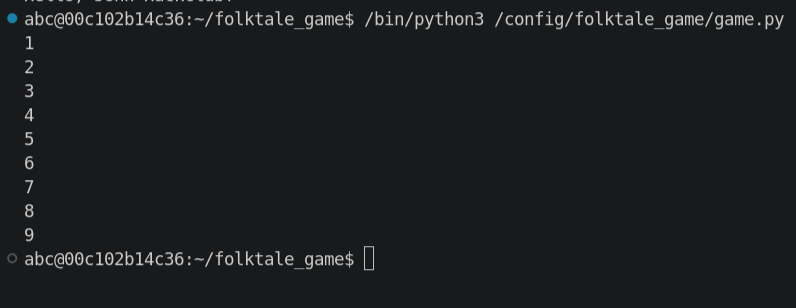
condition is true. Here's a quick example that counts from 1 to 10:
counter = 1
while counter <= 10:
  print(counter)
  counter = counter + 1
First, we make a variable called counter set to 1. We then make a while loop that runs as long as the counter is
less than or equal to ten. We reassign counter to itself plus one, incrementing it for the next iteration.
Quick tip, you can rewrite counter = counter + 1 as counter += 1. They are equivalent.
Another quick tip, when you're developing with while loops, it's easy to accidentally make an infinite loop. You can
press Ctrl + C or Cmd + C to exit out of the running program.
Think about these conditions that we've been sticking into the while and if statements. We've been thinking about
them in terms of making those statements go, but what actually happens under the hood? Well, Python has two statements,
True and False. You could plug them into if and while statements to make kind of unhelpful statements:
if 4 == 4:
  print("This will always run")
if True:
  print("This will always run")
while False:
  print("This will never run")
But these unhelpful statements can become very helpful for certain kinds of loops. In particular, loops where we don't
have a good condition to track. In the game we're about to make, we will be looping continuously. However, instead of a
nice counter that we're waiting to reach 10 before we exit the loop, we're instead exiting the loop on some arbitrary
win condition. We need a type of variable whose only purpose is controlling whether or not a while loop repeats. We
can use the True and False from before!
We make a variable that starts as True, and pass that into the while loop. Since it is True, the while loop
runs. Whenever we please, we can change that variable to be now set to False, which will now cause the while loop to
exit.
Here's the counter example rewritten to use this type of controller variable. For this example, it does complicate it, but you'll see in the next section how this can be a very elegant solution.
loop_running = True

counter = 1

# loop_running is True, so this while loop starts off running
while loop_running:
  print(counter)
  counter = counter + 1

  if counter >= 10:
    # This will cause the loop to exit next time it runs through
    loop_running = False
With that, you now know everything that you need to get started on a text adventure game! Here's a quick recap of everything covered so far:
- The
printfunction will output text to the user - The
inputfunction will replace itself with whatever was inputted by the user, and the prompt will be the parameter passed in - Variables are little named containers that let you store values for later, and you define them with
name = valuesyntax - The
intfunction converts text to a number - You can get the first character from a bit of text with
variable[0], the second withvariable[1], and so on ifstatements run the code indented underneath them if the condition inside them is trueelifstatements are the same asifstatements, but they only trigger if theifandelifstatements above them don't executeelsestatements are a catch-all for if allifandelifstatements don't execute- The
andandorkeywords can combine conditions together whilestatements are basicallyifstatements that run continuously so long as the condition is trueTrueandFalseare what's actually happening when we conditionally evaluate something likex == 3orx != 3(!=is not equal)
Conditional symbols table:
| Symbol | Meaning |
|---|---|
| == | equal |
| != | not equal |
| < | less than |
| > | greater than |
| <= | less than or equal |
| >= | greater than or equal |
Now, time to actually start game development!