
Making a Text Adventure Game
This section is structured a little differently from the rest. The past sections of the guide have been basically a list of instructions to follow. This page though, will be more of a story. I will walk through my thought process in making a adventure game, complete with code examples. Based on the snippets here, I'm super excited to see what you can come up with!
You should probably get rid of any example code you've typed out to this point. Unless you want to keep it in your game, of course!
Most projects start out with a plan. It doesn't have to be super advanced, but you should have some idea of what the project is going to look like before committing anything to code.
I wanted my game to be pretty simple. There is a locked door that needs two coins to get through. There are two rooms, each gives a coin after a small challenge. One of the rooms has a little math puzzle, the other is an anagram. Here's a diagram of the paths:
[Math Room] <- [Big Room] <- [Starting Room] -> [Winning Door (needs 2 coins)]
                    |
                    V
              [Word Room]
I started out by defining two variables, one to keep track of which room the player is in and one to keep track of how many coins they have.
room = 'starting'
coins = 0
game_running = True
Then, I wrote a while loop that reruns over and over so long as the game is still running. Inside this loop, I wrote
an if statement that runs some code that runs whenever the current room is the starting one. I print out two lines to
explain the room, then I grab a 1 or a 2 based on where the user wants to go. I set the room variable to the next code
for a room.
while game_running:
  if room == 'starting':
    print("You find yourself in a strange place. To your left, a giant door with two coin slots. To your right, a large, cavernous room")
    print("If you want to try to unlock the door, enter '1'. To enter the big room, enter '2'")

    answer = input("1-2: ")

    if answer == "1":
      room = "door"
    elif answer == "2":
      room = "big"
    else:
      print("Invalid input entered")
Next, I added the logic to handle the door. I put it inside the while loop as well, and the code will redirect back to
the starter room if they don't have enough coins. I'm also telling the player how many coins they have, and I need to
use the str function. This is because coins is being treated like a number, but we need to instead treat it like a
block of text. The str function does this.
  elif room == "door":
    if coins >= 2:
      print("You win!")
      game_running = False
    else:
      print("You need two coins to get through this door, but you only have " + str(coins) + "!")
      room = 'starting'
Afterwards, I added the big room logic. This will redirect between the math, word, and starting rooms depending
on the user's input:
  elif room == "big":
    print("You have entered the massive room. To your left, you see a math puzzle. To your right, you see a word puzzle.")
    print("Enter '1' to do the math puzzle, enter '2' to do the word puzzle, enter '3' to go back to the starting room")

    answer = input("1-3: ")

    if answer == "1":
      room = "math"
    elif answer == "2":
      room = "word"
    elif answer == "3":
      room = "starting"
    else:
      print("Invalid input entered")
Now for the math puzzle. There are four options here to choose from. Since I want the three incorrect answers to do the
same thing, I'm using the or operator to do this. Upon the correct answer, I add one to coins and return the player
to the big room. Remember that coins += 1 is the exact same as coins = coins + 1. I'm using the lower() function
so that the case doesn't matter:
  elif room == "math":
    print("You see in front of you the following puzzle:")
    print("3 + 4 * 2")
    print("Choose your answer below:")
    print("a: 8")
    print("b: 11")
    print("c: 14")
    print("d: 18")

    answer = input("a-d: ").lower()

    if answer == "a" or answer == "c" or answer == "d":
      print("Sorry, that is incorrect")
    elif answer == "b":
      print("That is correct! You have been awarded 1 coin")
      coins += 1
      room = "big"
    else:
      print("Invalid input entered")
The word puzzle is pretty similar to the math one, except the response is open ended this time.
  elif room == "word":
    print("You see in front of you the following puzzle:")
    print("Descramble the name of an animal: cnorcoa")

    answer = input("Type out your answer: ").lower()

    if answer == "raccoon":
      print("That's correct! One coin has been awarded")
      coins += 1
      room = "big"
    else:
      print("Sorry, that is incorrect")
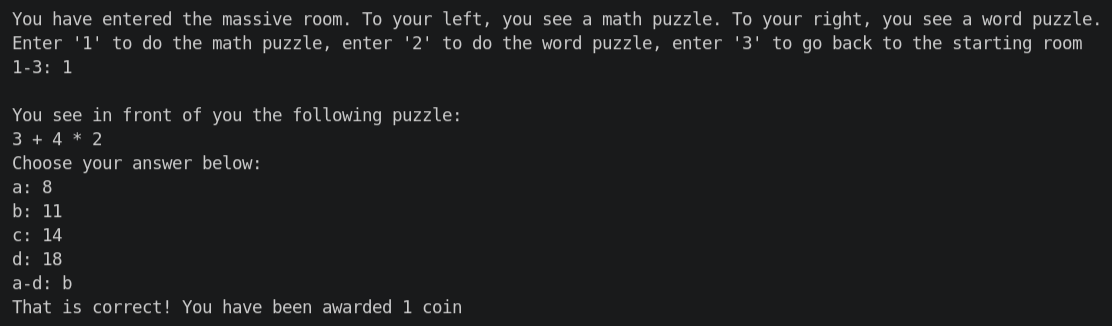
And that's just about it! You don't have to close out with an else statement if it isn't needed. There's one more
thing that I want to do. Just for the sake of aesthetics, I want to add a blank line of space each time this loop runs.
I did this by adding the following to the end of the while loop:
print("")
Remember to get the amount of indentation right!
And there's the example. Now, it's up to you. Build your own game of this style, submit it, get yourself a sticker sheet! Please don't just copy the code example above, make it your own!
Please read down to the bottom of this page first, though.
If you get any of the Python code rules wrong, the editor will sometimes underline it in red, and sometimes it'll give you an error when you try to run it.
Not all errors are from not following the rules, though. Sometimes the computer has no problem running the code, but what it does isn't what you're intending. These can be nasty to track down, because a computer will do exactly what you tell it to, which doesn't always match up with what you want it to do. There's a few errors like this that I've left in this example code that might do something a little different than what was intended. See if you can find them!
If you get stuck with anything, ask away in the #folktale-help Slack channel. You can join this the same way as you
joined #folktale.
To re-iterate the AI policy from the FAQ on the homepage, there is to be zero generative AI usage for Folktale. While these tools can be legitimately helpful, I would heavily encourage you avoid them until later in your programming journey. Productive struggle is the root of learning, and AI tools rob the teachings that let you use these tools effectively.
You need to spend at least one hour working on this before you can submit it. If you haven't met this, there's definitely another room or something that you could add. You can check your time at the Hackatime Dashboard. We have swag for especially high effort submissions here.
Hack Club is a nonprofit that relies on donations in order to give out prizes to teenagers all around the world. As such, we have to verify that all hours are well substantiated. Please don't try to game the system by inflating your time through a rock on the keyboard or something. We'll catch it through our fraud tools, have to go through a process, and it won't end well for anyone.
If you're having trouble coming up with ideas, here's a few you could try:
- A medieval dungeon crawler game (like this example! (but also don't copy it exactly))
- A quiz/trivia game
- A guess-the-number game (you'll need to generate some random numbers for this. Google is your friend!)
- Adapt a physical game into the terminal. Maybe Chopsticks, or Blackjack, or something else entirely.
- A typing test/game
With that out of the way, I'm really excited to see what you create!
Happy Hacking!
Once your project is in a finished state, take a look at the final manual page on how to upload and submit your project.